Thursday, 23 June 2016

AAEON Takes “EPIC” Steps Beyond the Standard


AAEON Takes “EPIC” Steps Beyond the Standard


EPIC: An Introduction
In 2004, the PC/104 Embedded Consortium released the standard for Embedded Platform for Industrial Computing, more commonly referred to as EPIC. This standard for SBCs was intended to fill the gap that existed between the small, stackable PC/104 solutions and the larger EBX solutions. According to the PC/104 Embedded Consortium, “the purpose of this specification is to define a physical platform for the mid-sized embedded Single Board Computer (SBC) with multiple I/O expansion options. Its size is midway between the industry standard PC/104 stackable format and EBX SBC format. The added space allows for combining features on an SBC which would normally be found on multiple PC/104 modules”


As noted by the PC/104 Consortium, the EPIC standard defines a board that has x and y dimensions well- suited for smaller embedded industrial PC systems. With more board level real estate, EPIC systems can accommodate greater I/O integration as compared to its sister PC/104 standard that would require more stack-on peripheral boards. The dimensional increase also allows for the use of higher performance processor that often call for advanced heat dissipation. Take note of this issue of heat dissipation.

Reduced Total Cost of Ownership
AAEON’s EPIC products are fully tested for compatibility and equips a comprehensive set of core functionalities that render additional modules unnecessary (less expansion), effectively lowering the total cost of ownership (TCO) by 10 ~ 20%.

Legacy I/Os Expandability
In computing, looking back is as important as looking forward. In that regard, AAEON’s EPIC products are designed to support legacy systems with the inclusion of the PC/104, PCI-104 (or PCIe) for prolonged use of tried-and-true systems while future-proofing it with newer, more modern technologies.

CPU Solder up Design
Since the Cedar View platforms, aka EPIC-CV07, EPIC-BT07, EPIC-QM77, EPIC-BDU7, AAEON’s EPIC products have boosted the “Solder up” design that places the CPU at the solder side of the PCB. Aiming to take the hassle out of thermal management, the design allows users to adopt a broader range of coolers (even making the idea of treating the chassis as a heat sink possible) without altering the layout of the components, saving development and system integration costs.


Wide Voltage Solution
Depending on the situation for which the solution is deployed, voltage can be a major hurdle to overcome. With this idea in mind. AAEON’s EPIC products are built to support a wide voltage range of 9-24V design to reduce the possibility of damaging the onboard components in the event a DC to DC converter module is used. In addition, the extended voltage range grants enhanced adoptability as up to 80% of today’s industrial requirements can be adequately satisfied, without the need for additional power modules.
Flexible System Assembly 
The EPIC standard is exceptionally well-suited for smaller embedded industrial PC applications with its generous dimensions, offering a compact system with I/Os most conducive in today’s industrial use. AAEON’s EPIC board offers has on them up to six USB ports (USB 2.0/ 3.0), eight COM ports (RS-232/422/485), and two Mini-PCIe slots to satisfy the needs for extra components without assembling additional I/O modules.


“EPIC” Technology in Action
The AAEON family of EPIC SBCs offers a line of versatile solutions. These highly integrated SBCs can be found serving the requirements of various industry segments from mobile infotainment to industrial automation, and even in the retail space. Due to the fact that AAEON has made these EPIC SBCs much like a component in terms of mechanical and thermal consideration, the benefits they bring to application developers are truly “EPIC” and considerably minimize the limitations for implementation.


EPIC-SKS7
The EPIC-SKS7 is the latest and most advanced member of AAEON’s EPIC product family with a 6th Generation Intel® Core™ processor. The enhanced performance delivered by the chips came in form of support for up to 16 GB of DDR4 memory and clearer, higher resolution video output, making it viable in demanding applications such as high resolution machine vision equipment or mini-servers. The board also sports a CPU socket allowing for greater flexibility.

EPIC-BDU7
Based on the Broadwell platform, the EPIC-BDU7 carries a U-series CPU that lowers power consumption to 15 W, while still delivering impressive performance for 4K resolution media content or triple independent displays. The abovementioned solder up design is featured on this board in addition to the inclusion of the PCI-104 interface, two features that place the board in an ideal position for applications where legacy systems are in place and convenient thermal management is required, namely industrial automation and certain military equipment.


EPIC-BT07
While the Intel® Core™ series is deemed overpowered for certain applications, such as industrial HMIs, the EPIC-BT07 will be up to the task with its lower grade, but less power hungry Intel® Atom™ CPU. Still sporting a solder up design, the board is capable of dual displays as well as wide voltage support of 9 ~ 24V with a healthy set of I/Os, including six USB ports, two RJ-25 ports, and as many as six COM ports. Similar to its Broadwell counterpart, the EPIC-BT07 also uses a fanless thermal solution.

EPIC-CV07 & EPIC-QM57
The most mature and seasoned platform among the AAEON EPIC product family, the EPIC-CV07 and EPIC-QM57 have been the staples of the product line and ideally suited in applications ranging from industrial machinery to intelligent transport. Support for legacy systems are highlighted with the boards’ PCI-104 and PCIe interface as well as older operating systems such as Windows XP. In addition, the EPIC-CV07 carries as many as eight COM ports while the EPIC-QM57 sports a CPU socket for greater flexibility. 


About AAEON
AAEON is a leading manufacturer of advanced industrial and embedded computing platforms. Committed to innovative engineering, AAEON provides integrated solutions, hardware and services for premier OEM/ODMs and system integrators worldwide. Reliable and high quality computing platforms include industrial motherboards and systems, industrial displays, rugged tablets, PC/104 modules, PICMG half-size and full-size boards and COM modules, embedded SBCs, embedded controllers and related accessories.

AAEON also offers customized end-to-end services from initial product conceptualization and product development on through after-sales service programs. 

AAEON is a GSA contract holder (#GS-35F-0470Y) serving the Federal, State & Local government sectors. AAEON is also an Associate member of the Intel® Internet of Things Solutions Alliance. From modular components to market-ready systems, Intel and the 400+ global member companies of the Alliance provide scalable, interoperable solutions that accelerate deployment of intelligent devices and end-to-end analytics. Close collaboration with Intel enables Alliance members to innovate with the latest technologies, helping developers deliver state-of-the-art, first-to-market solutions. 


More information can be found regarding all of AAEON’s product lines at http://www.review-displays.co.uk or call us on 01959 563 345


Friday, 17 June 2016

Introducing the Wide Temperature C353W full HD PCI Express Mini Video Capture Card.


Now available from RDS, the AVerMedia C353W DarkCrystal HD Capture Mini-PCIe solution is a PCI Express mini video capture card based on H.264 hardware compression delivering high definition recording and low CPU consumption. With the addition of an adaptor daughter board, capturing and receiving of additional HDMI or VGA input sources provides greater flexibility and possibilities for monitoring, archiving or analysing HD video content. The DarkCrystal HD offers stable operation in extreme environments under temperatures ranging from -40°C to 85°C (-40°F to 185°F).

Features:
Hardware H.264 Compression
Wide temp range of -40°C ~ 85°C (-40°F ~ 185°F)
PCI Express Mini Card form factor
HDMI/ VGA input interface
Max capturing 1920 x 1080 60fps
Up to 60Mbps encoding capability
Low power consumption (1.5 Watts)


Module Type
PCI Express Minicard
Input
HDMI
VGA(D-Sub)
DVI (HDMI Adaptor, optional)
Video Resolution
Max. Input Resolution -1080p60
Max. Resolution Captured – 1080p30
VESA Resolution Supported
Captured Video Output
H.264 Transport Stream
RAW Video (YV12 4:2:0)
Color Adjustment
VGA: Brightness, Contrast, Hue (NTSC only), Saturation
HDMI: not supported
Operating Environment
Temperature: -40°C to +85°C
Humidity: 0 to 80% RHNC
Storage Environment
Temperature: -40°C to +85°C
Humidity: 0 to 90% RHNC
Power Requirement
2.5W
Dimensions (mm)
50.8 x 29.85
System Requirements
CPU
Intel® Core™2 Duo 2.4GHz
AMD Athlon™ 64 X2 Dual Core 2.8GHz
Intel® Core™ i5-2500(4 cores/3.3GHz) or above is required for WMV format recording
Memory
2GB RAM
AVI Format Recording Requirement
SSD is required for AVI format recording:
- Read: 200MB/s (or above)
- Write: 200MB/s (or above)
- System AHCI function needs to be activated
- SATA III interface on motherboard is required
VGA
VGA card with support for DirectX9.0c or above
Standalone graphics card is recommended for HD video capturing
Sound Card
Yes
Operating System
Windows® 8/7 (32/64-Bit)


Call RDS on 01959 563 345 for more details.


Thursday, 9 June 2016

AMT and RDS at Computex Taipei 2016


Computex Taipei and SID Display Week 2016 both wrapped up recently. AMT took advantage of these two exhibitions to display a number of new products and is happy to report on our success on the show floor. We would also like to thank all our customers and good friends who were able to take time out of their busy schedule to visit our booths. It was truly a pleasure seeing you again. This year, AMT's continuing innovation and technical expertise further differentiated its products from the competition. In this issue of AMT News, we will share with you the unique performance of AMT products.
In terms of projected capacitive (PCI or PCAP) touch features, our standard PenMount PCI controller firmware supports both gloved touch operation and advanced water handling modes simultaneously. In fact, one of the highlights of AMTouch USA's SID booth was a AMT 21.5" PCI touch solution featuring a 15mm thick cover lens which supports gloved touch and water handling at the same time. These three superior functions lead competing PCI touch solutions. Our PCI touch products do not have to choose between using "gloved touch operation" and "water handling." In other words, we have integrated "gloves," "water," and "thick glass" to allow our customers to operate a PCI touch panel with a thick cover lens normally while gloved and protected from false touch points caused by water on the PCI touch surface. This is also the utility and convenience in real world environments we have envisioned for our customers. PenMount had integrated these features into one firmware during initial design to facilitate customer adoption and use.

PenMount recently released its latest utility called PenMount PCIUtility. By integrating three current utilities (PCIMSet, PMUpdate, PCIScan), PCIUtility offers a new intuitive interface that facilitates the easy adjustment of commonly used parameters, diagnostics of touch functions, and controller firmware updates. PenMount PCIUtility gives customers unprecedented control at the press of a button. Our utility does not require complex parameter adjustment and can reduce the associated time and resources required of engineers. This kind of increased user-friendliness and interaction allows the simple and convenient setting and adjustment of PCI touch panels.
Review Display systems is the UK leading supplier of AMT touch screens. If you need any information or would like to discuss any new projects you have then please get in touch.
09159 563 345
Daniel Burke
Sales and Marketing.


Thursday, 26 May 2016

Ubuntu 16.04 LTS - is it any good?


Ubuntu 16.04 LTS - Review.


The Ubuntu desktop has seen very little change since Ubuntu 14.04 LTS was released two years ago. That’s about to change with the recent launch of Ubuntu 16.04 LTS—code-named “Xenial Xerus”—which brings big changes and welcome polish to the classic Unity 7 desktop.
What’s new for the traditional Linux desktop
If you’re using the Unity 7 desktop—now Unity 7.4—you’ll have a better experience than ever before. Those controversial online search results—which some people called “spyware”—are now disabled by default. Ubuntu won’t send your local searches over the Web to show you shopping results anymore.
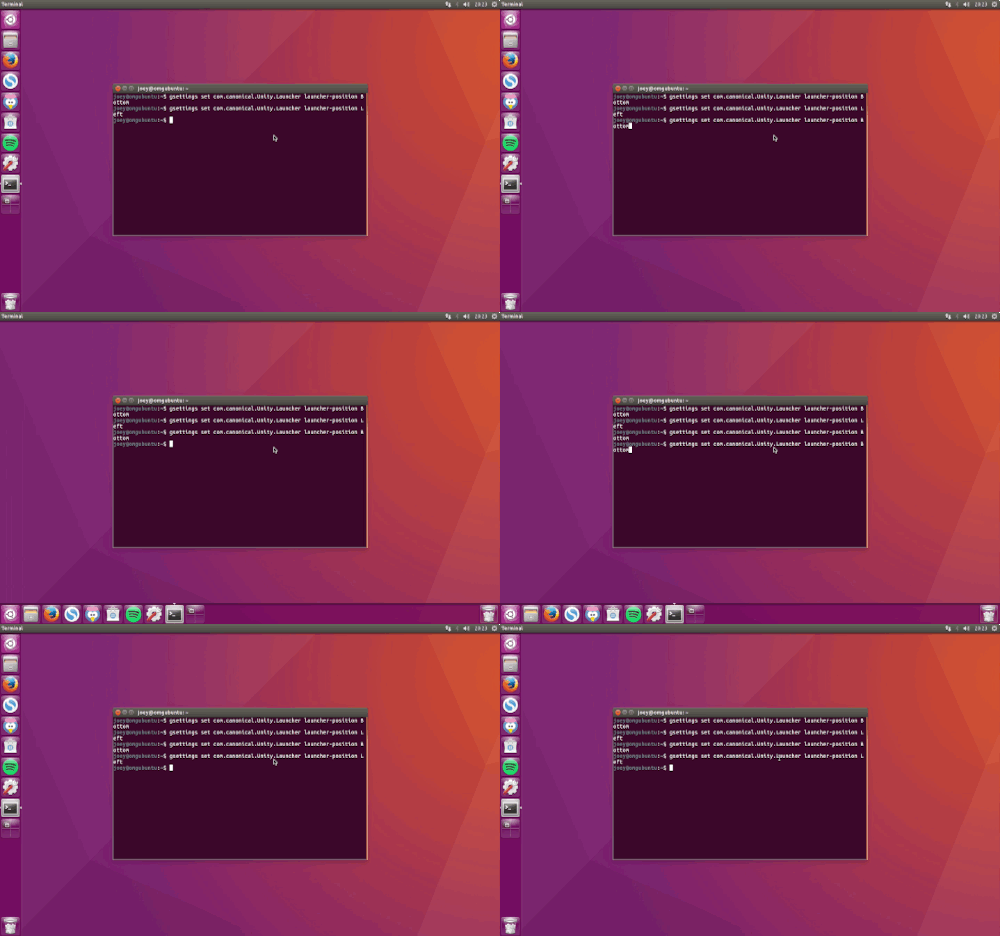
Unity 7 also now, at long last, lets you move your launcher to the bottom of the screen. The feature is hidden and requires a terminal command, but it’s officially supported. Unity 7.4 brings a variety of other little improvements and bits of polish that make this a satisfying revamp.
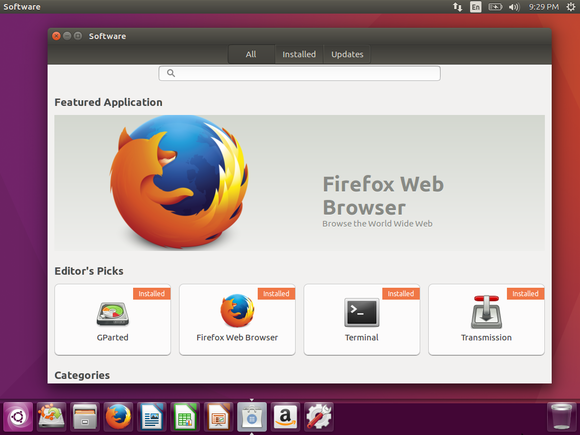
The aging Ubuntu Software Center is now gone, replaced by the shiny new GNOME Software application that Fedora has been using for several releases. In addition to traditional Deb packages, Ubuntu now supports “Snaps,” which can be installed alongside Debs. Because they’re self-contained packages that can include their own dependencies, Snaps can’t mess with the rest of your system. They’ll be ideal for installing proprietary software or the latest versions of big open-source projects—like desktop environments—without risk.

Ubuntu’s Unity desktop has never been more polished and user-friendly.

The Brasero disc-burning application and Empathy instant-messaging software have been removed from the default installation, although they can still be installed from GNOME Software. Ubuntu now includes GNOME Calendar and the Cheese webcam application by default. Under the hood, you’ll find version 4.4 of the Linux kernel, which offers improved support for PCs with Intel Skylake chipsets.

There’s good and bad news for AMD graphics users. Ubuntu 16.04 LTS will support AMD’s new AMDGPU graphics driver architecture, which should help close the gap with Nvidia’s exceptional Linux drivers. Unfortunately, Ubuntu 16.04 LTS no longer supports the current AMD Catalyst driver, also known as “fglrx.” AMD graphics card users may want to stick with Ubuntu 14.04 until AMDGPU has matured. That is, if you’re using the card for gaming or other demanding chores. AMD graphics will work just fine if you’re performing standard desktop activities.
Where’s Unity 8 and the converged desktop?
Ubuntu 16.04 LTS stands as a solid traditional Linux desktop that will serve users for the next few years. Still, convergence features, which blur the lines between desktop and mobile devices, are slowly arriving. That’s part of the Unity 8 desktop, which is now stable enough that it’s shipping on the first Ubuntu tablet, although it’s still early days for this software.
The Unity 8 desktop isn’t included on Ubuntu 16.04 LTS by default, but it’s available to install from the repositories as a preview. If all goes as planned, Ubuntu 16.10 will feature Unity 8 by default, giving Ubuntu developers a whole two-year development cycle—until the next long-term service release, Ubuntu 18.04 LTS—to improve the new desktop and make it ready for a general Linux desktop audience. Until then, Ubuntu users have a lot to enjoy with the current Unity desktop.


Ubuntu 16.04 — New Features

Linux Kernel 4.4

TuxlogoUbuntu 16.04 LTS ships with a modified version of Linux 4.4 kernel.
It introduces numerable improvements to system stability, performance, power efficiency, and file system handling, and introduces support for newer Intel and AMD hardware.
  • Improved Intel Skylake processor support
  • 3D support in the virtual GPU driver
  • New driver for Corsair Vengeance K90
  • Support for TPM 2.0 chips
  • Journaled RAID 5 support
It also introduces drivers for the Logitech G29 racing wheel and enables support for hardware features on some newer Toshiba laptops.

ZFS

A bigger (and somewhat controversial) change is the addition of support for the Zfs filesystem on Linux — the first version of Ubuntu to support it natively, out of the box.
ZFS is best described as a combination of a volume manager (like LVM) and a filesystem (like ext4, which remains the default for Ubuntu installations).

Other System Changes

Python 3.5 is default in 16.04. Apps that are based on and/or use Python 2 remain available and will continue work as normal. Developers are advised to upgrade their software to take advantage of Python 3.
As we’ve previously warned, if you use a device with AMD Radeon graphics hardware you should NOT upgrade at present. The fglrx driver is now deprecated in 16.04, and although open source alternatives (radeon and amdgpu) are recommended, they do not deliver comparable performance.


Snappy is Ubuntu’s brand new packaging format. It aims to help app developers bring newer versions of their apps to the Ubuntu desktop, instantly, reliably and safely.
We took a look at the key benefits of Snap packages in an earlier post, which is well worth a read for a full rundown.
But the short of it is this: you will get to install new versions of your favourite apps in Ubuntu sooner than before, and without having to worry about missing or out of date dependencies.

New Keyboard Shortcuts

The default shortcut for opening the HUD (the ‘heads-up display’ that lets you quickly search for options in the menu of focus applications) changes from ALT to ALT+SPACE in this release.
The window control keybinding changes from  alt-super.

Unity 7.4

2016-04-06 20_25_32
Unity is Ubuntu’s default desktop shell. A host of bug fixes for some long-standing issues feature in its latest outing.
Yes, as you may have heard by now, Ubuntu 16.04 finally lets you move the Unity launcher to the bottom of the screen — six long years after users first asked.
The ‘option’ to change the position is not exposed via the native system settings app, instead lurking in the nerdy nether regions of the dconf-editor. Third-party utilities like Unity Tweak Tool (available from Ubuntu Software) offer an easier, one-click toggle, however.
Ubuntu’s controversial online search features are now disabled by default for new installs.
A victory for the privacy conscious,you’ll no longer need to sift through  tangentially related eBay, Wikipedia and web results when hunting down a local file or app.
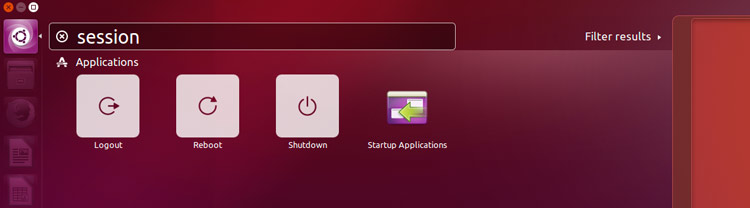
Session shortcuts have been added to the Dash to make it even faster to reboot, logout or shutdown your PC.
unity session shortcuts
Other changes in Unity 7.4:
  • Removable devices now have launcher shortcuts
  • ‘Format’ option added to device quicklist
  • Improved appearance of apps that use CSD
  • New app spread shortcut: Super + Ctrl + W
  • Window management fix for Trash
  • New HUD shortcut: Alt + Space (previously just ‘Alt’)
  • Option to ‘Always Show Menus’ in System Settings
  • Dash: new overlay scrollbars
  • Improved HiDPI support
  • Apps now show launcher icons while loading

LTS to LTS Changes

Easily create desktop shortcuts
Changes since Unity 7.2 (used in Ubuntu 14.04 LTS)
Since a good chunk of you will be doing an upgrade from Ubuntu 14.04 LTS we’ll mention some other notable tweaks to the desktop shell since the version you’re used to was released.
Among them:
  • App menus can be made to ‘Always Show’
  • Faster login & logout animations
  • New overlay scrollbars (no more thumb scrubber)
  • Drag and drop apps from the Dash to the desktop to create shortcuts
  • Computer can no longer be ‘shutdown’ when the screen is locked
  • Dash: Keyboard navigation improvements
  • New setting to control the show-now delay (when pressing Alt key)
The Sound Menu will show a microphone input volume slider on devices with a built-in (or connected) microphone. In earlier versions the input slider was only shown when the microphone was actively in use by an application.
sound menu microphone input

New Default Wallpaper

ubuntu 16.04 wallpaper

Almost every new version of Ubuntu comes with a new desktop background and a selection of new community-contributed wallpapers.
The default desktop background is a palatable mish-mash of purple, though far removed from the heady days of the Hardy Heron! Whether you keep it or change it, the new default desktop wallpaper will at least make it easier to spot Ubuntu in the wild! 

Application Updates

software center new to ubuntu 16.04 LTS
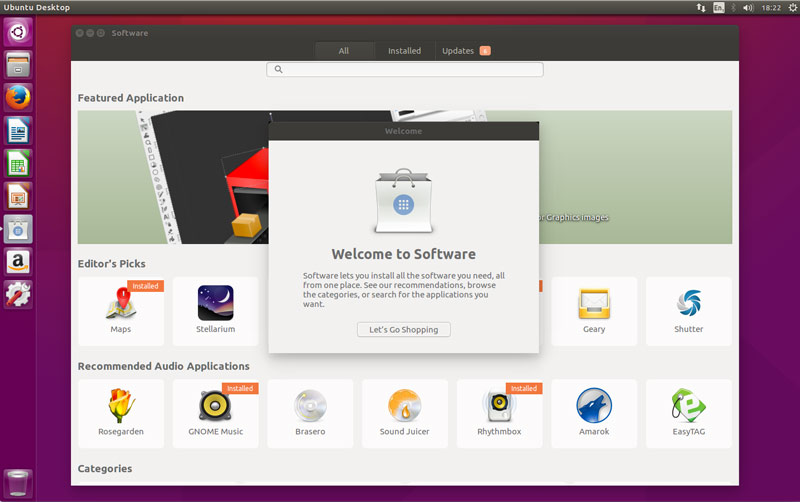
Several new apps ship as part of Ubuntu 16.04 LTS, including a new desktop calendar app and a brand-new software store (pictured above).
Both are welcome additions to the desktop, with Calendar able to show your upcoming appointments and reminders in the Datetime Indicator.
The new Software app replaces the Ubuntu Software Center.  Use it to search for, browse and install from hundreds of thousands of free and open-source application, as well as a few non-open-source and paid apps, too.
It’s not perfect — it doesn’t always mark installed apps correctly, it leaves behind dependencies on uninstalls — but these bugs will be fixed in subsequent updates.
The Cheese webcam booth lets you — surprise — take screen-lit selfies using your webcam.
The latest releases of Mozilla’s Firefox web-browser and Thunderbird e-mail client are (naturally) also included, as are new versions of other key apps like LibreOffice, Evince and the Eye of GNOME image viewer.
software calendar and usb creator
Software, Calendar and USB Startup Creator
Two apps you will no longer find on new installs are the disc-burning utility Brasero and the instant-messaging client Empathy.
Both have been removed from the ISO image.
If you’re upgrading from an earlier release note that these apps won’t be uninstalled.


Unity 7 once again removes ammunition for its critics to fire.
Xenial is an agreeable release. It’s a desktop operating system that’s as well suited for end users as it is developers as it is mainframes like the IBM LinuxOne.
Many often think of “convergence” as being solely a smartphone that becomes a PC. But from smartphones to supercomputers, Ubuntu is already converged.
With a support period of five years, the lure of new apps through the promising Snappy package system, and the very best hardware support, the case for not upgrading is pretty thin.
Ubuntu 16.04 LTS in a nutshell:
  • Improved Unity desktop
  • Online searches disabled in Dash
  • Linux Kernel 4.4
  • New Software store
  • Updated apps, inc. LibreOffice 5.1
  • New desktop calendar app
  • Support for ZFS
  • Python 3.5

In our opinion this new release is worth the upgrade and can be downloaded  from:
http://releases.ubuntu.com/16.04/